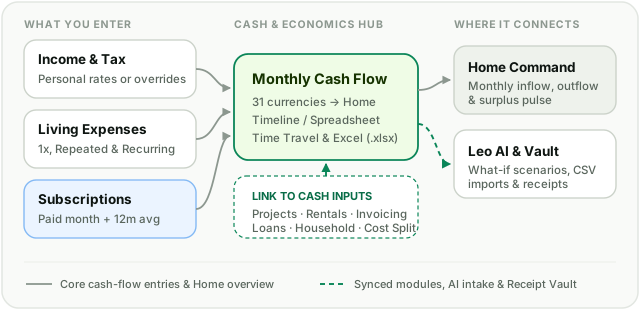
Bring salaries, bills, irregular purchases, and annual subscriptions into one multi-currency ledger. Model after-tax income, edit full schedules in a spreadsheet timeline, and connect projects, rentals, loans, and invoicing directly to your monthly cash flow.
Subscriptions appear in the months they are actually paid, paired with a trailing 12-month monthly burn rate.
How it works & connects
Enter salaries, recurring bills, and actual-month subscriptions directly, or pull in synced activity from Projects, Rentals, Invoicing, Loans, Household, and Cost Split.
How it works in practice
One-time, Repeated, and Recurring entries
Record a single bill, a variable Repeated expense series with individual transaction dates and receipts, or a Recurring stream with scheduled future changes and single-month overrides.
True subscription timing & 12-month burn rate
Annual or quarterly renewals count in the month cash actually leaves your account—never blurred into fake monthly averages—while your Subscriptions KPI keeps the trailing 12-month burn rate visible.
Timeline / Spreadsheet & Time Travel
Switch from cards and charts into a 12-month spreadsheet grid to review categories and update multiple months quickly, or inspect past and future months risk-free.
Personal tax baselines & accounting Excel export
Set default Income, Capital Gains, and Rental tax rates in Settings or override per entry, and download formatted multi-sheet Excel workbooks whenever you need them.
How it connects across LeoSum
Cash & Economics acts as the live cash-flow hub of LeoSum. Its Link to Cash controls bring in approved expenses and earnings from across your workspace without double entry.
How does LeoSum handle foreign currencies and conversions?
Enter each income, expense, subscription, or asset in its native currency across 31 supported currencies. LeoSum converts every row into your primary currency using verified European Central Bank reference snapshots while keeping the original amount visible underneath.
How do Scheduled Changes differ from editing an amount?
Editing the baseline updates your entry going forward, whereas opening the Updates tab on a recurring salary or bill lets you schedule a new amount, note, or billing cadence from a chosen future month onward—or apply a single-month override without altering future months.
How are annual or irregular subscriptions counted in Cash & Economics?
Annual and multi-year subscriptions appear as outflows in the exact calendar months they are paid so your monthly cash flow matches real life, while the trailing 12-month average in parentheses on Subscriptions shows your annualized monthly burn rate.
Does Cash & Economics support receipt attachments?
Yes. Attach photos or PDFs to one-time, repeated, or recurring entries, and optionally save them to your household Receipt Vault with warranty expiration tracking.