Automated allowances & tactile Give / Take wheel
Schedule weekly or monthly pocket money automatically, and give or deduct spending amounts in seconds with an interactive balance wheel and clear transaction history.



Kids’ wallets, pocket money & chores
Replace paper IOUs and forgotten pocket money. Set recurring weekly or monthly allowances, adjust balances effortlessly with the interactive balance wheel, review photo-verified chores or kid proposals, and give each child a safe, scoped login showing only their wallet and chores.
Illustrative example · EUR

Children sign in with a parent-managed username and PIN/password and never see adult financial modules.
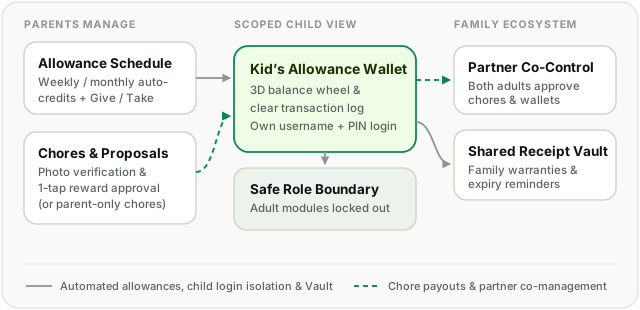
Schedule weekly or monthly pocket money automatically, and give or deduct spending amounts in seconds with an interactive balance wheel and clear transaction history.
Assign one-off or repeating chores with optional rewards, let kids propose extra chores, require photo proof when helpful, and approve payouts in one tap.
Create a username and PIN/password for each child so they can check their own wallet balance and tick off chores—with adult Cash, Growth, and Settings completely locked out.
Keep kids' gear, electronics, and household warranties organized in one searchable vault with automatic expiry alerts.
Family Allowances & Chores sits alongside Partner Sharing inside Household, letting both parents co-manage kids' wallets while keeping child sessions safely isolated.
One monthly expense. One saving goal. One shared adventure. Choose a module and build your picture at your own pace.