Planned budget vs. itemized actual costs
Log budgeted estimates alongside actual paid invoices in multiple currencies, spot overruns early with visual progress meters, and group synced project costs cleanly in Cash.



Renovation & milestone budgeting
Renovations, weddings, equipment upgrades, or big trips rarely fit inside a single monthly category. Track planned budgets against actual contractor and material costs in any currency, invite collaborators, archive warranty receipts, and choose which actuals flow into Cash.
Illustrative example · EUR

Actual costs can stream continuously to Cash & Economics and attach warranty receipts directly to your Vault.
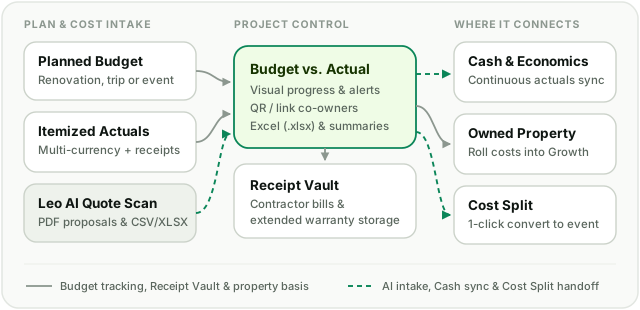
Log budgeted estimates alongside actual paid invoices in multiple currencies, spot overruns early with visual progress meters, and group synced project costs cleanly in Cash.
Attach contractor invoices or store warranties directly from a project cost row with extended retention options so proof of purchase stays searchable years later.
Invite partners, co-owners, or friends via project code or link to co-manage costs, or convert a shared project into a Cost Split event when everyone needs to settle up.
Upload PDF contractor proposals or CSV/Excel cost lists to Leo AI to extract line items into a reviewed project import before saving.
Projects bridge short-term planning, long-term property value, and shared expenses across your household.
Toggle continuous or per-cost sync to reflect actual project spending in Expenses.
Growth & InvestmentsLink home renovation projects to an owned Property position.
Cost SplitConvert a group project into a Cost Split event to settle shares between participants.
Partner SharingShare Projects with your household partner alongside Cash and Growth.
One monthly expense. One saving goal. One shared adventure. Choose a module and build your picture at your own pace.