From logged hours and retainers to clean PDF invoices and true after-tax profit.
Designed for independent consultants, freelancers, and small studios. Save client defaults, log billable work or expenses in seconds, convert agreed rate currencies cleanly, issue branded PDF and Excel invoices, and see your real ex-VAT profit and estimated tax set-aside.
VAT is tracked separately from revenue and profit, and hidden FX buffers never print on client invoices.
How it works & connects
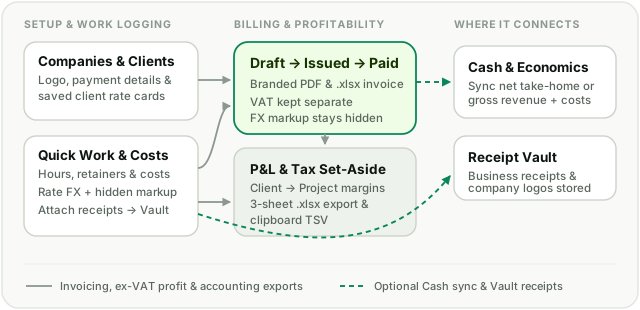
Save client rate cards, log billable hours and foreign-currency costs, issue branded PDF or Excel invoices with VAT separated, and project net or gross results into Cash.
How it works in practice
Company profiles, client rate cards & retainers
Configure one or multiple sender companies with logos and payment details, save default currency, VAT, payment terms, and rates per client, and track monthly retainers alongside hourly or fixed projects.
Fast work logging, receipts & agreed rate currency
Log billable hours, billable expenses, or internal costs straight to an open draft invoice or unbilled queue, attach receipts to your Receipt Vault, and convert agreed rate currencies with optional hidden FX markup.
Branded PDF & Excel invoices + Draft-to-Paid workflow
Bundle unbilled entries and monthly retainers into draft invoices, print crisp PDFs or download single-invoice Excel files, track due dates, and check off paid invoices.
Ex-VAT profitability charts & accounting exports
Inspect monthly Revenue & Profit or Hours & Rate charts, compare Client → Project margins, estimate tax set-aside on net profit or gross revenue, and download 3-sheet .xlsx workbooks.
How it connects across LeoSum
Invoicing keeps business bookkeeping cleanly separated from personal spending while syncing the cash numbers you choose into your household overview.
Can I agree on an hourly rate in USD or EUR and invoice in another currency?
Yes. Each project supports a separate Rate currency and Billing currency. Billable work and retainers convert using monthly FX rates (or a manual 1-click override) plus any optional hidden FX markup, without printing the markup percentage on client PDFs.
Does pass-through VAT distort my profit or Cash sync?
No. LeoSum separates pass-through VAT from ex-VAT revenue and profit across profitability charts, P&L waterfalls, and accounting Excel exports.
How does Invoicing sync with Cash & Economics?
Per project, you can choose Not tracked in Cash, Net income (a single take-home line), or Income & expense (gross collected revenue and business costs projected read-only into Cash).
Can I export data for my accountant or Google Sheets?
Yes. Export a formatted 3-sheet .xlsx workbook (Summary & Profitability, Invoices, Entries & Expenses) scoped by company, client, and period, or copy tab-separated rows straight to your clipboard.